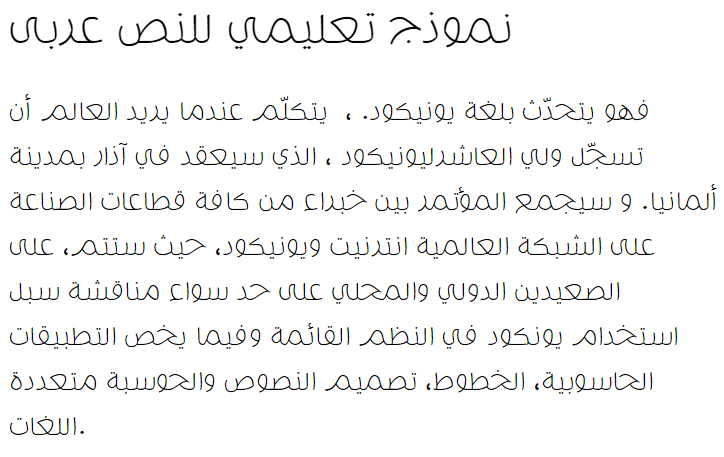
Free Download Molsaq Arabic Extra Light

Molsaq Arabic Extra Light is most popular/used font in the State of Saudi Arabia. Project name of this font is MolsaqArabic-ExtraLight. Personaly feel free to use Molsaq Arabic Extra Light but when you use this font commercially please contsct- Copyright � 2015 by Ali Almasri. All rights reserved..

Please complete humanity verify use captcha code below for download Molsaq Arabic Extra Light font.


More Information of Molsaq Arabic Extra Light

✓ Copyright � 2015 by Ali Almasri. All rights reserved.
✓ MolsaqArabic-ExtraLight
✓ com.myfonts.easy.abjad.molsaq-arabic.extra-light.wfkit2.version.4ucm
✓ MolsaqArabic-ExtraLight
✓ Version 1.030;com.myfonts.easy.abjad.molsaq-arabic.extra-light.wfkit2.version.4ucm
✓ MolsaqArabic-ExtraLight
✓ Abjad Type Foundry
✓ Ali Almasri
✓ abjadtype.com
✓ alialmasri.com
✓ &


If captcha not working, click on Reload button & try again.
format_size
text_rotation_none
format_line_spacing
Molsaq Arabic Extra Light Arabic Font

Convert any font to any font, like ttf to eot, svg, woff & more!!!   click here >>

Short Details of MolsaqArabic-ExtraLight.ttf

Font Family : MolsaqArabic-ExtraLight
Font Subfamily : &
Font Identifier : com.myfonts.easy.abjad.molsaq-arabic.extra-light.wfkit2.version.4ucm
Full Name : MolsaqArabic-ExtraLight
Version : Version 1.030;com.myfonts.easy.abjad.molsaq-arabic.extra-light.wfkit2.version.4ucm
Postscript Name : MolsaqArabic-ExtraLight
Download : 996 Times
Copyright : Copyright � 2015 by Ali Almasri. All rights reserved.
How to install Molsaq Arabic Extra Light in your computer?

For Windows 7 / Vista users:
- Right-click the Molsaq Arabic Extra Light font file(s) and choose "Install".

For users of the previous Windows versions:
- Copy Molsaq Arabic Extra Light font & pest into a default Windows font folder (usually C:\WINDOWS\FONTS or C:\WINNT\FONTS)

For Mac users:
Mac OS X 10.3 or above (including the FontBook)
- Double-click Molsaq Arabic Extra Light font file and hit "Install font" button at
the bottom of the preview.

Mac OS X
- Either copy the Molsaq Arabic Extra Light font file(s) to /Library/Fonts (for all users), or to /Users/Your_username/Library/Fonts (for you only).

Mac OS 9 or earlier
- You have to convert the Molsaq Arabic Extra Light font file(s) you have downloaded. Drag the font suitcases into the System folder. The system will propose you to add them to the Fonts folder.

For Linux users:
- Copy the Molsaq Arabic Extra Light font file(s) to /USR/SHARE/FONTS
Random Fonts
MCS Taybah S_U Heart Arabic Font
MCS Taybah S_U Heart
Download
View Count : 807
FS_Arabic_Kidnap_Points Arabic Font
FS_Arabic_Kidnap_Points
Download
View Count : 1633
Mcs Abha Ver Oout Arabic Font
Mcs Abha Ver Oout
Download
View Count : 817
MCS HAND Arabic Font
MCS HAND
Download
View Count : 650
SC Sharijah Arabic Font
SC Sharijah
Download
View Count : 2889
Shekari Font Arabic Font
Shekari Font
Download
View Count : 1541
Damavand-Light Arabic Font
Damavand-Light
Download
View Count : 1772
Most Downloaded
DecoType Thuluth II Arabic Font
DecoType Thuluth II
Download
View Count : 236839
AlHurraTxtBold Arabic Font
AlHurraTxtBold
Download
View Count : 106479
AlHadari Arabic Font
AlHadari
Download
View Count : 66043
Aldhabi Arabic Font
Aldhabi
Download
View Count : 52533
Zapfino Arabic Arabic Font
Zapfino Arabic
Download
View Count : 39002

close
Please like, if you love this website
Privacy Policy   GDPR Policy   Terms & Conditions   Contact Us